

Introduction
In this blog, you will understand how to prevent students from blocking teachers in Google Chat. Google Chat is very popular for communication both in professional and educational sectors. Although Google Chat makes communication easy with in-built features, one feature make it difficult. Google Chat allows blocking anyone that you don't want to chat with. But this creates problem when students blocks teacher itself, which causes trouble in educational environment.
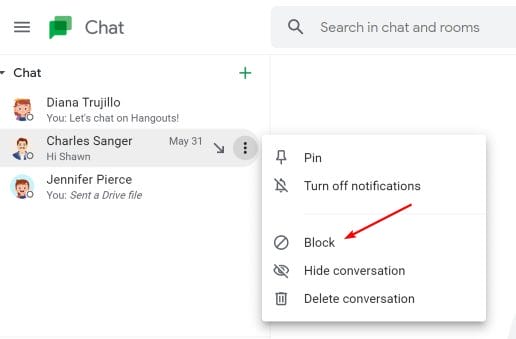
Why Prevent Students from Blocking Teachers in Google Chat
If students blocks teachers, it becomes difficult for teacher to reach out to students for any educational related tasks or concerns. Communication is the key in virtual learning, hence preventing the blocks on teachers in Google Chat is very important.
Let's understand it through a scenario -
- Problem: Ms. Rio, a high school teacher, shares an important assignment to students with strict deadline. Some students completely ignore the deadline and keep spending time on unnecessary content. And when teacher asks about the submission, they blocks her in Google Meet to escape.
- Solution: After Ms. Rio understand the problem, she thinks of stopping the behavior by imposing block on it. She found Safe Doc useful in this case. Safe Doc policy prevented students from blocking teachers in Google Chat.
- Result: After policy implementation, students could not block any teachers to escape from learning. This helped them to focus on learning and completing assignment on time.
Introduction to xFanatical Safe Doc
xFanatical Safe Doc is a browser extension which provides various policies for administrators to control and safeguard students learning environment. Safe Doc offers polices to manage Google Chat effectively such as blocking link preview in Google Chat and disabling creation of spaces in Google Chat using Safe Doc etc.
Prevent Students from Turning In Assignment Late with xFanatical Safe Doc
Google Chat allow students to block anyone and creates chaos during learning. In digital learning, Google Chat is the source of communication and if students block the teachers then they wont be able to communicate. To prevent this problem, Safe Doc offers BlockChatBlockUser policy to stop students from blocking teachers in Google Chat for effective digital environment.
The Block user feature in Google Chat appears in 3 places as given below:
- Hover a user on the Chat lists and click the
 context menu
 - Click the user and click the user name at the chat top bar.
- In the pop up chat dialog in the bottom right, click the context menu.
 context menu
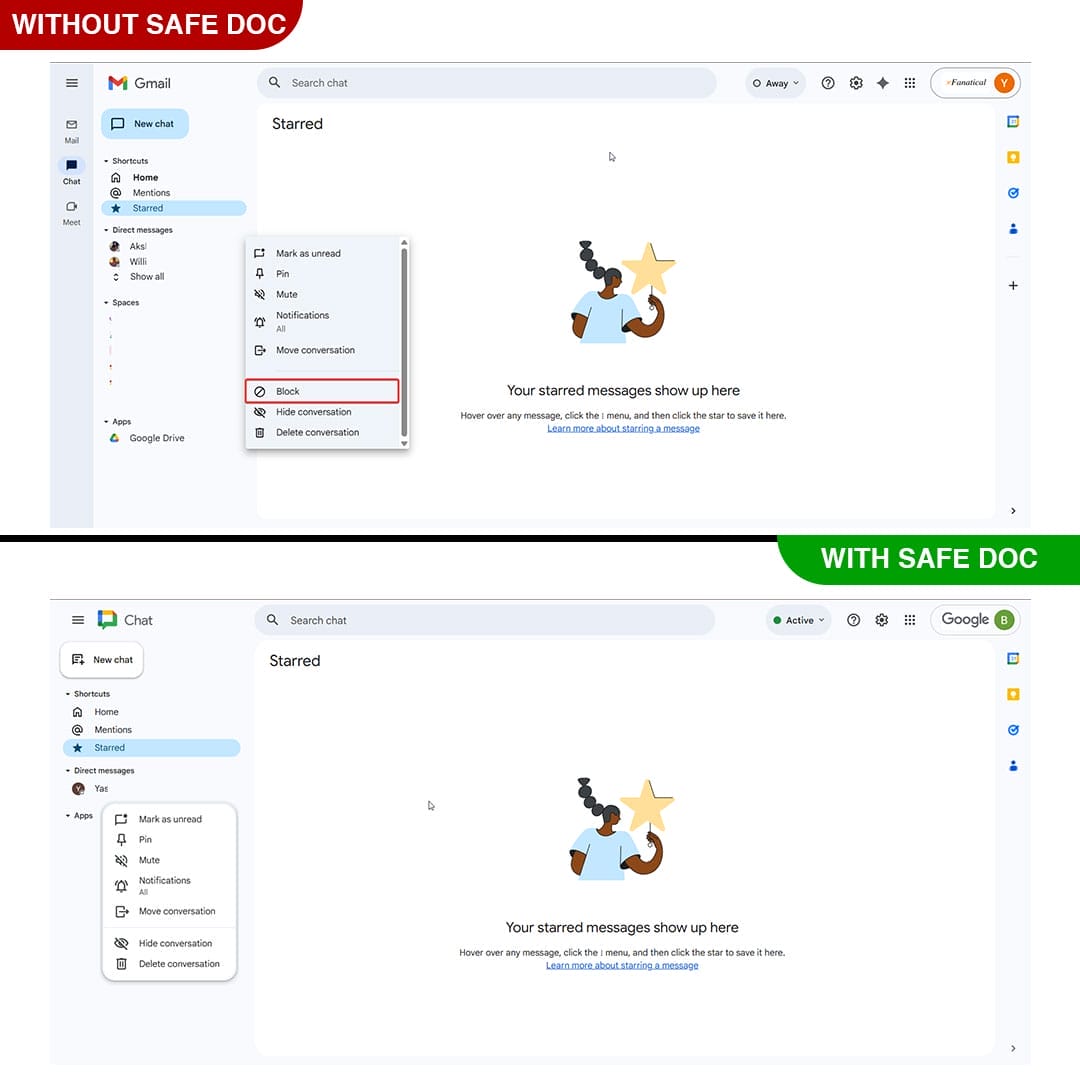 xFanatical Safe Doc removes block option
 xFanatical Safe Doc prevents students from blocking users
How to configure Safe Doc
Step 1: Install Safe Doc
The first step is to install Safe Doc in your Google Workspace environment.
Step 2: Configure Safe Doc settings
Once you install Safe Doc, you can configure its settings to prevent students from Turning In assignments late in Google Classroom.
Step 3: Access Google Admin Console
Now, navigate to the Google Admin Console. In the Google Admin Console, click on Devices followed by Chrome. Then, select Apps & Extensions and click on Users & Browsers.
Step 4: Review the Policy
Find the policy you wish to apply and save it. The policy will display in a below format:
"BlockChatBlockUser": {
  "Value": true
}
Step 5: Save the Policy
Finally, click the Save button to apply it.
Limitation
This policy does not automatically unblock users. To do so, please ask the students to unblock your teachers in their blocking list following Google's documentation Block and report someone.
Conclusion
So hopefully after going through this article you have understood why and how to stop students from blocking in Google Chat. Please go through the article thoroughly and follow the steps in the correct order so as to get the desired results. If you face any problem or have any query please feel free to comment below we will respond as soon as possible.
To learn more about enhancing online safety with xFanatical Safe Doc, visit our website xFanatical Safe Doc and install Safe Doc to get 30 days free trial.
 xFanatical Safe Doc
