

Introduction
Google Search is widely used in school environments for research and learning and administrators are responsible for ensuring students use it productively. Google includes interactive features like the Minecraft Easter egg, which allows students to play a game directly within the search page.
While this feature is designed for engagement, students may misuse it during class hours. And it leads to distractions and reduced focus on academic activities.
Since Google Workspace does not provide a direct way to disable Minecraft in Google Search, administrators must look for alternative solutions to control such behavior.
This guide will walk you through:
- Information about Minecraft in Google Search
- Why schools need to block this feature
- Challenges in managing such interactive elements
- Available solutions to restrict Minecraft gameplay
- And how to block Minecraft in Google Search using xFanatical Safe Doc
What is Minecraft in Google Search
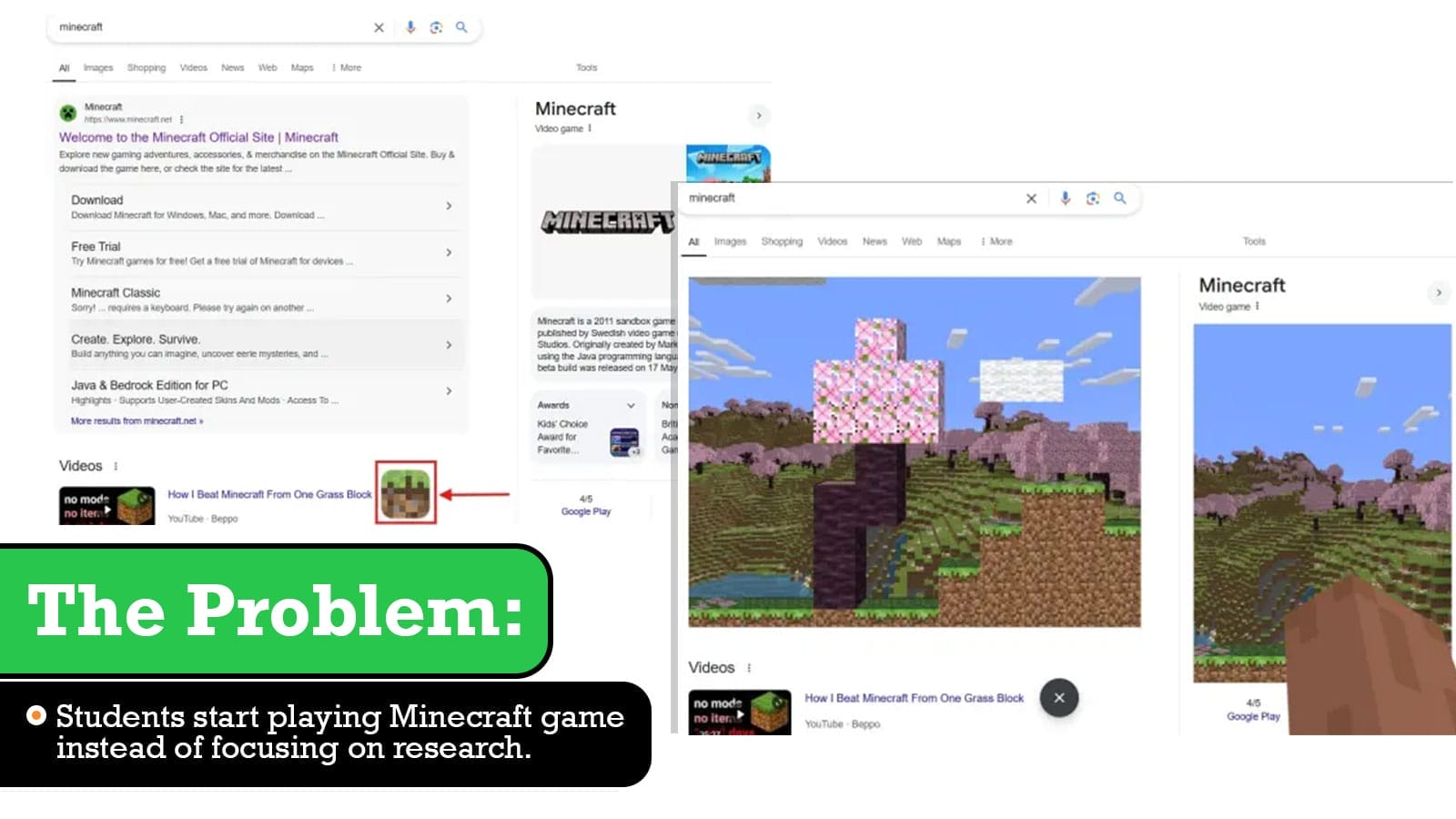
Minecraft in Google Search is an interactive Easter egg that appears when users search for Minecraft-related queries. It shows a Replay animation button on the search page. When clicked, it allows users to interact with the page in a game-like mode, where they can break elements and experience a simplified Minecraft environment directly within the browser.
Although it is meant for entertainment, in school environments, this feature can distract students from their studies.
Video Demo
The Problems Caused by Minecraft in Google Search
Interactive features like Minecraft can create multiple challenges in K-12 environments. While they may seem harmless, they can significantly impact classroom discipline and learning outcomes.
For example, a student searching for study material may notice the Minecraft icon and start playing. This quickly spreads across the classroom as other students follow, disrupting the entire session.
Following are some risks:
- It becomes difficult for teachers to monitor whether students are genuinely researching or engaging in games.
- Students may get distracted and spend time playing instead of studying.

Why Google Workspace Cannot Disable Minecraft in Search
It is important to understand why this feature cannot be controlled using native Google Workspace settings.
The Minecraft Easter egg is part of the Google Search interface itself and not a configurable service within the Admin Console. Since it is embedded directly into the search experience, administrators do not get any policy to disable Minecraft easter egg game in Google.
This limitation makes it challenging for schools to maintain a distraction-free environment using only default controls.
Impact of Feature on Schools and Managed Environments
In managed environments, controlling how students interact with content is critical. Features like Minecraft in Search make this more difficult.
- One major challenge is that the game is not a separate application or website. It appears within the search results, making it harder to detect Minecraft Google Search features using traditional filtering methods.
- Another issue is the lack of visibility. Teachers may not immediately notice that students are engaging with the game, as it runs within the same browser window used for learning.
Let’s consider a real-time example:
“Students were asked to research a science topic using Google Search. Within minutes, some students discovered the Minecraft icon and started interacting with it. Soon, others joined in, and the entire class became distracted. It became difficult to bring their focus back to the lesson.”
“We had applied multiple restrictions in Google Workspace, but since this feature is part of Google Search itself, students could still access it. This reduced the effectiveness of our classroom controls.”
Recommended Solution to Disable Minecraft in Search
Browser-Level enforcement provides real-time control directly within the browser, instead of relying only on backend policies. To solve this problem effectively, xFanatical Safe Doc provides a dedicated solution. xFanatical Safe Doc is a browser extension that provides policies to maintain focused and secure learning environments for K-12 students. It provides policies to manage a safe and productive digital environment.
With Safe Doc, administrators can prevent students from playing Minecraft in Google Search by disabling the Replay animation button, ensuring students cannot access or play the game during class hours.
This helps schools maintain a distraction-free learning environment and ensures that Google Search is used strictly for educational purposes rather than entertainment.
For more detailed technical steps, kindly refer to step-by-step implementation of Safe Doc.
Block Minecraft in Search with xFanatical Safe Doc
With Safe Doc, administrators can block the Minecraft Replay animation button in Google Search, preventing students from accessing the game. Admins can enable the BlockGoogleSearchMinecraft policy, which removes the Minecraft easter egg games in Google Search. 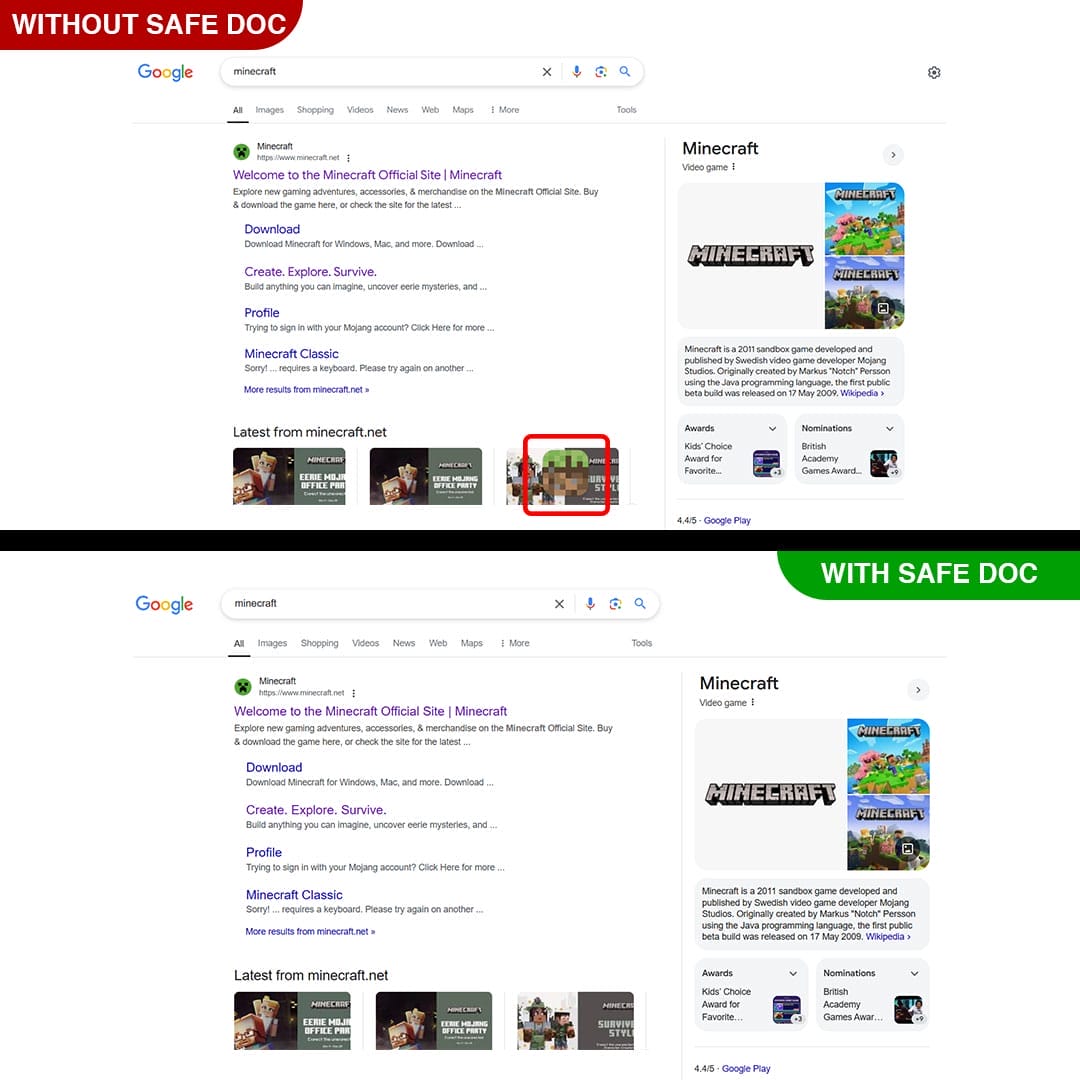
xFanatical Safe Doc removes the Minecraft’s Replay animation button in Google Search page
How to Block Minecraft on Student Chromebooks Using xFanatical Safe Doc
Step 1: Get xFanatical Safe Doc:
To get started, you have to install xFanatical Safe Doc in your Google Workspace environment. It is a browser extension, which supports safe and distraction-free learning in educational settings.
Step 2: Configure Safe Doc settings:
Once Safe Doc is installed, you can configure its settings to prevent students from playing Minecraft on Google Search page. To configure Safe Doc successfully, make sure you have deployed Safe Doc on your students' Chrome browsers and review the xFanatical Safe Doc Configuration document for detailed instructions.
Step 3: Access Google Admin Console:
Next, navigate to the Google Admin Console. In the Google Admin Console, click on Devices > Chrome > Apps & Extensions > Users & Browsers.
Step 4: Set the Policy:
You will find the list of policies. Find the BlockGoogleSearchMinecraft policy, if not found then add the policy as below format and set value as true.
"BlockGoogleSearchMinecraft": {
"Value": true
}
Step 5: Save the Policy:
Once you are done with above step, click the Save to apply.
Conclusion
Since Google Workspace does not provide a native way to block Minecraft in Google Search, administrators need alternative solutions to manage such distractions.
xFanatical Safe Doc provides an effective way to control interactive elements within the browser, including the Minecraft feature. By disabling the Replay animation button, schools can ensure students stay focused on learning without unnecessary interruptions.
This helps improve classroom discipline, maintain productivity and create a distraction-free digital learning environment.
To learn more about how xFanatical Safe Doc can help enhance online safety in your educational institution, visit our website xFanatical Safe Doc
Explore xFanatical Safe Doc with 30 days of trial.
 xFanatical Safe Doc
