

Introduction
Google Classroom allows students to communicate with teachers through private comments on assignments. While this feature is useful for asking questions or clarifying doubts, it can also be misused in K-12 environments.
Imagine a classroom where a teacher assigns homework through Google Classroom. Instead of using comments for academic queries, some students start sending irrelevant or inappropriate private messages. Since these comments are not visible to others, it becomes difficult for administrators to monitor or control such interactions.
Additionally, Google Classroom does not provide a direct way in the Admin Console to disable private comments. This creates a challenge for schools that want stricter control over communication.
In this guide you will learn:
- Why private comments can be problematic
- The impact of unrestricted private comments
- Available solutions and their limitations
- And how to disable private comments using xFanatical Safe Doc
The Problem Caused by Private Comments in Google Classroom
Private comments in Google Classroom allow one-to-one communication between students and teachers. While intended for academic discussions, they can lead to issues when misused.
A teacher shares their experience with the IT administrator:
“I noticed that some students were using private comments to send unrelated messages instead of asking questions about assignments. Since these are private, I cannot monitor everything effectively.”
Another common concern is inappropriate communication:
“Some students send messages that are not relevant to the assignment. It becomes difficult to track and manage these conversations across multiple classes.”
Why Disabling Private Comments is Not Possible Natively
Private comments are a built-in feature of Google Classroom designed to support communication between students and teachers.
Although administrators can manage user access, class permissions and sharing settings through the Google Admin Console, there is no setting available to completely disable private comments.
This means administrators cannot prevent students from sending private comments using native controls.
The Impact of Private Comments on Schools
Unrestricted use of private comments can create multiple challenges in school environments.
- One major issue is lack of visibility. Since comments are private, administrators cannot monitor communication effectively.
- Another impact is students may misuse private comments for non-academic or inappropriate conversations.
- Additionally, it increases the workload for teachers, who must manually review and manage these messages, reducing their focus on teaching.
Available Solutions to Turn Off Private Comments in Google Classroom
Schools can try the below approach to manage Google Classroom comments feature, but it comes with limitations.
- Solution 1: Using Native Google Workspace Controls
Google Workspace provides controls to manage Classroom access and user permissions, but it does not offer any native way to disable private comments.
Administrators can navigate to the Google Admin Console under Apps > Google Workspace > Classroom, select the appropriate Organizational Unit (OU) and configure settings related to class access and sharing permissions.
Private comments will still be available on assignments. In short, native controls help manage access but do not restrict private communication.
Limitation: These controls do not prevent students from sending private comments. - Solution 2: Browser-Level Enforcement (Recommended)
Since the above approach has some limitations, schools need to solve the problem by using browser-level enforcement, instead of relying on policies.
This approach uses a browser extension to enforce granular, real-time control directly within the browser. The browser extension works at the browser level without depending on backend policies.
With Safe Doc, administrators can restrict the students from sending private messages to teachers by removing the option from the interface. This ensures students cannot misuse the feature during online classes.
For more detailed technical steps, kindly refer to step-by-step implementation of Safe Doc.

Disable Private Comments in Google Classroom
xFanatical Safe Doc is a browser extension designed to help schools maintain a secure and focused digital learning environment. It provides granular control over Google Workspace features that are not available through native settings.
By enabling the BlockPrivateCommentInClassroom policy to block private comments, administrators can prevent students from using this feature entirely. This helps maintain appropriate communication and reduces misuse.
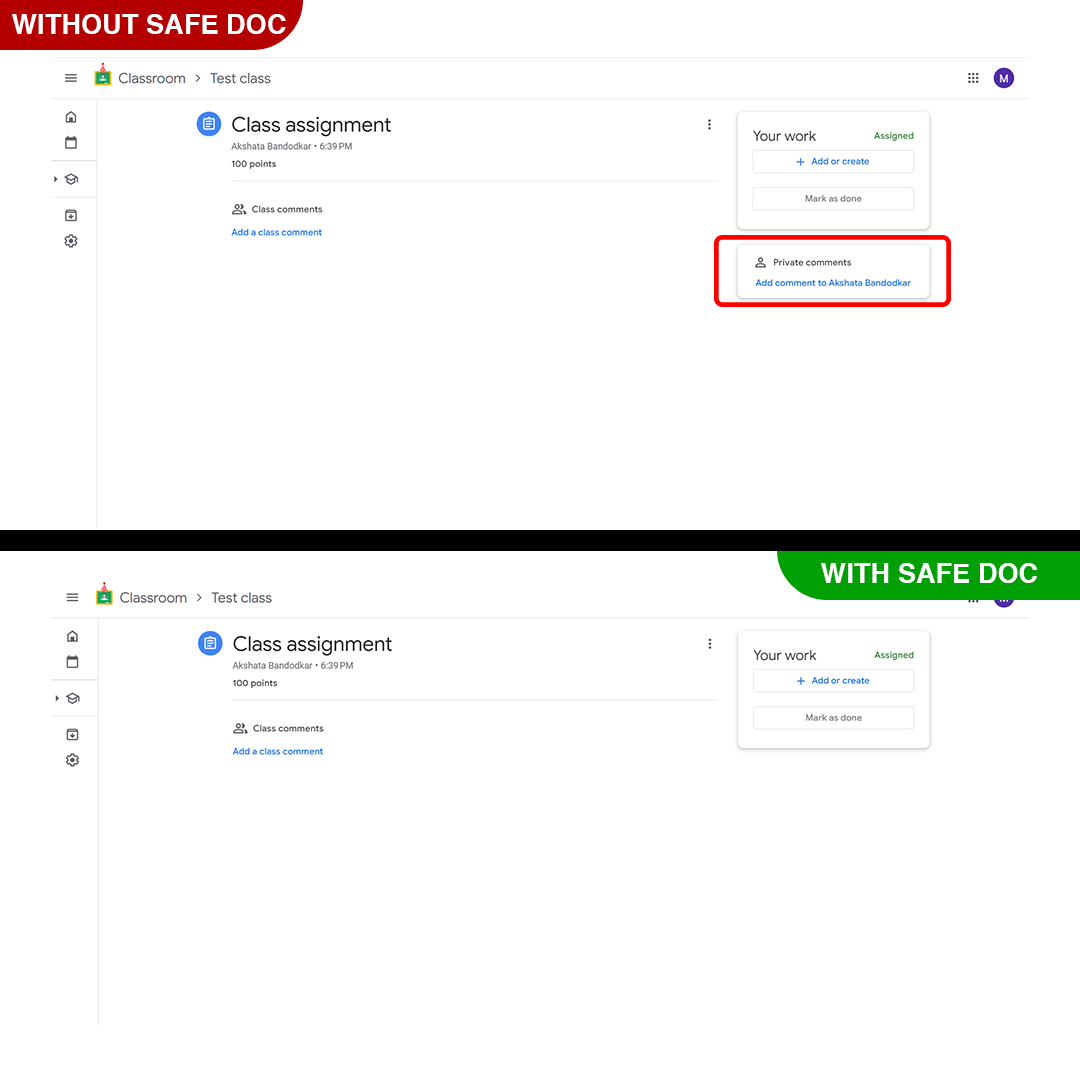
Disable Private Comments in Google Classroom
Video Demo
How to disable private comments in Google Classroom using xFanatical Safe Doc
Step 1: Install Safe Doc:
The first step is to install Safe Doc in your Google Workspace environment. Safe Doc is a browser extension that seamlessly integrates with Google workspace, providing enhanced control and security features.
Step 2: Configure Safe Doc settings:
Once Safe Doc is installed, you can configure its settings to allow school admins to restrict private comments in Google Classroom. To configure Safe Doc successfully, make sure you have deployed Safe Doc on your students' Chrome browsers and review the xFanatical Safe Doc Configuration document for detailed instructions.
Step 3: Access Google Admin Console:
Now, navigate to the Google Admin Console. In the Google Admin Console, click on Devices > Chrome > Apps & Extensions > Users & Browsers.
Step 4: Review the Policy:
Find the policy that you wish to apply and if not found, then add policy as given below:
"BlockPrivateCommentInClassroom": {
"Value": true
}
Step 5: Save the Policy:
Finally, click the Save button to apply it.
Conclusion
Since Google Classroom does not provide a direct way to disable private comments for students in Google Classroom, administrators must rely on alternative approaches. Native controls are limited and cannot prevent misuse. xFanatical Safe Doc offers an effective solution by enabling browser-level control. By disabling private comments, schools can improve communication, reduce misuse and create a more structured learning environment.
To learn more about how xFanatical Safe Doc can help enhance online safety in your educational institution, visit our website xFanatical Safe Doc and install Safe Doc to get 30 days trial.
 xFanatical Safe Doc
