
Introduction
This blog is all about what is a CSV file and it's benefits. In today's world all the data is in digital form. It is one of the widely used for storing and reading data in a easiest way. In such cases it is very important to know what is a CSV file and what is it's format. These files are used for storing tabular data and useful for data management. CSV files are very convenient while transferring data and storing data into databases. This guide got you covered with all necessary points about CSV.
What is a CSV file?
A CSV file is a text file that contains data separated by comma as a delimiter. The CSV stands for Comma Separated Values. Each record stored in a CSV is a line of data and are separated by commas.
What is the CSV file format?
The CSV file format is nothing but the way data is stored. The file extension for CSV is .csv. Excel files are very close the CSV file but are different. The basic difference between two files are the formats.
For example - CSV file is stored as .csv and fields separated by comma. Excel files are stored as .xls file and data is stored in rows and columns. Excel files are capable to save formulas, whereas CSV files cannot do that.
Why .csv files are used?
In the business, CSV files are used for different purposes. They mostly used for exporting bulk data to a database with higher data concentration. Following are the advantages of using .csv files -
- The website developer can easily create a CSV format because it is a plain text file.
- They are extremely lightweight, making them easier to import or export into a spreadsheet or as a spreadsheet.
- It can be sent to another storage database, irrespective of the software used by the client.
- CSV files are easy to organize and copy amount of data, so you can store them in the best way possible and can access them through simpler methods.
What Does a Sample CSV File Look Like?
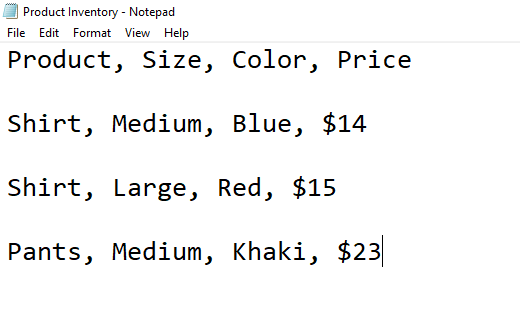
A CSV file is very simple and easy to understand. It does not require any technical knowledge to read or create. Basic example given below to see how a CSV is structured.
Product,Size,Color,Price
Shirt,Large,Pink,$14
Shirt,Medium,Blue,$15
Pants,Small,Cargo,$23
In this example:
- The first row contains the column headers, which describe the type of data in each column.
- Each row below the header represents a single record.
- Values in each row are separated by commas.
- The Product column lists item types such as shirts or pants.
- The Size column includes values like small, medium or large.
- The Color column contains text-based values.
- The Price column combines a currency symbol with numerical values.
When you open a CSV file in a basic text editor like Notepad, it appears exactly in plain-text format. When opened in spreadsheet tools such as Google Sheets or Excel, the same data is automatically organized into rows and columns.
How to Open a CSV File in Microsoft Excel?
- Open an MS Excel Spreadsheet. Have a look at the ribbon on top. Then find the File tab and click on it. A pop-up sub-menu will be displayed. Then click on Open.

- Click on Browse and then the File Explorer box will. You need to click on the drop-down menu to the right bottom-hand of the box near the File name field. Normally, the default value here is All Excel Files. You need to change it to All Files.

- Go where the CSV has been stored. Select it.


Note: You can also change the delimiter from comma to semicolon or as you prefer.
This is the entire procedure to open a CSV in Microsoft Excel. You can also open a CSV in Google Sheets and as a .txt file.
How to Create a CSV File From Excel?
It is very easy to create a CSV file from an Excel spreadsheet. Follow the steps given below -
- First, go to the File tab and Open the Excel document you want to convert into a CSV.

- After opening the file, navigate to the File tab menu and select Save As submenu. Choose the Other Formats option after that.

- After that, you need to change the File Format. Next choose CSV (Comma delimited). Pick the location you want to save the file. Navigate to that specific location, give the file the desired name, and then click on Save.


This is the way you can make a CSV file from an Excel (.xls) file. But it can be quite burdensome if you have to perform this action on thousands of files. To save yourself from wasting time and effort, you can use xFanatical Foresight.
Introduction to xFanatical Foresight
xFanatical Foresight is an automation tool for performing repetitive tasks in Google Workspace. xFanatical Foresight can import and export different data files for Google Admin in CSV format for better usage and readability. For example - Exporting Google Chrome devices list, bulk suspend users by Group/OU in Google Workspace, or export users from Google Workspace, etc.
Conclusion
Now you know what is CSV file and why it is widely used. It is easy to create, read, edit and share without any technical knowledge. Whether you want to manage user data, students scores or transfer information, CSV files are the best solution Follow this guide and know everything about CSV files and format. For more questions, please feel free to comment.

