

We’re excited to announce the release of xFanatical Foresight v4.14.0, which introduces new automation templates designed to simplify language management in Google Workspace.
What’s New in v4.14.0
This release adds two new ready-to-use templates:
- [Template] Set default language for new users by Organizational Unit (OU)

Setting new users’ default language by organizational unit (OU) is an important administrative task for organizations that manage users across multiple regions or languages. When new users are added, they expect the system to automatically reflect their preferred language. Without the correct default language, they may face difficulties in navigating Google Workspace apps. Non-technical users may require additional IT assistance, increasing support tickets.
For IT teams who manages multilingual environments, configuring language settings manually for each new user becomes time-consuming and inconsistent task. Automating this process ensures new users receive the correct language from day one, improving onboarding process and minimizing support requests.
Learn more in Set default language for new users by Organizational Unit. - [Template] Bulk change preferred language for existing users

Bulk updating preferred languages in Google Workspace is a crucial task for organizations with teams spread across different regions or speaking multiple languages. When users work in their familiar language, they navigate Google services more comfortably, leading to better productivity and fewer support requests. Managing these settings manually, becomes inefficient and error-prone, especially when dealing with hundreds of accounts during onboarding or organizational changes. Automating this process ensures users receive the correct language settings instantly, helping IT teams maintain consistency, reduce workload and deliver a smoother experience across the entire work environment.
Learn more in Bulk change preferred language for existing users.
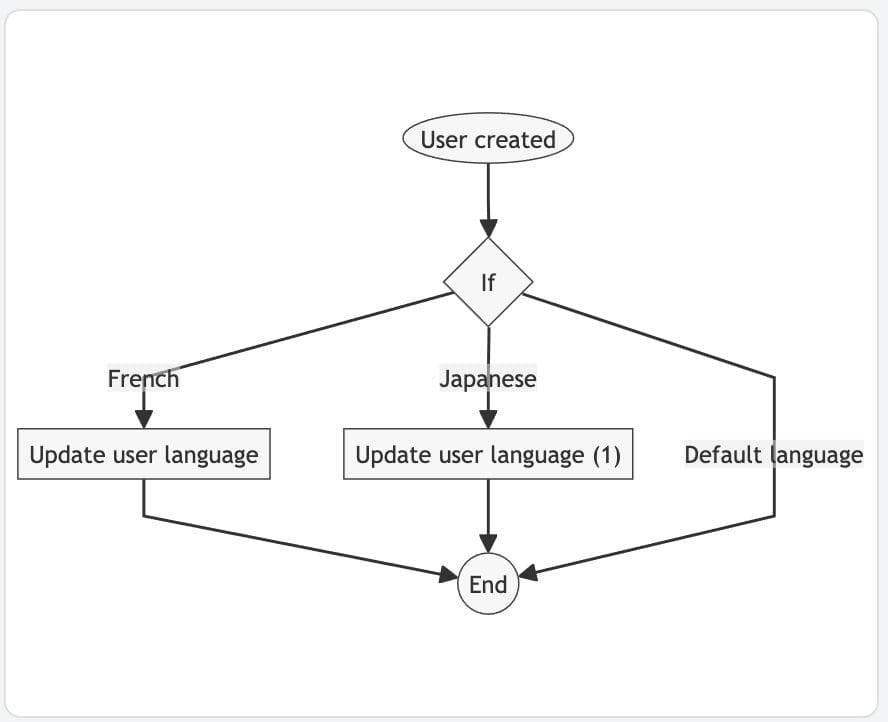

Together, these new templates empower IT administrators to maintain consistent language settings across departments and regions, reduce manual configuration during user onboarding, and efficiently manage multilingual environments at scale. As always, these automations are easy to configure and deploy directly within xFanatical Foresight, helping you save time while maintaining consistency and control.
New Actions
- Update user language - This action is used to automate user language preferences.

- Update user custom attributes - This action is used to manage user additional profile attributes


Enhancements to existing actions
- Added support for exporting custom attributes in the List users action by allowing them to be selected in the Column field

- Support custom attributes as variables in the Get user info action for advanced user management automation


Improvements
- Improved usability of the variable selection dropdown with a sticky subheader for easier navigation
- Enhanced the rule setup experience by showing a confirmation alert before exiting the dialog to prevent accidental changes
Issue fixes
- Fixed a rare issue where the New calendar event trigger did not fire during initial calendar synchronization
- Fixed an issue where file uploads failed in the Upload data to Drive action during network interruptions
- Fixed an issue where the Update group settings action displayed an unclear automation log message.
- Improved the automation log message clarity for the Send message to Chat action.
- Fixed an issue where the Change group member role action returned an unknown error reason in automation logs
- Fixed an issue where rule updates failed for some customers using the Create user action
- Fixed a rare issue where the User created trigger failed due to network connectivity problems
- Fixed an issue where the Add event attendee action returned an unknown error reason in automation logs
Conclusion
The xFanatical Foresight v4.14.0 release focuses on making user management automation more flexible, reliable, and admin-friendly. With new language management templates, enhanced user profile controls, and expanded support for custom attributes, admins can now automate user settings with greater precision and scale. Usability improvements in rule setup and variable selection further streamline the automation experience, while the extensive issue fixes ensure stronger stability, clearer logs, and more dependable triggers and actions. Overall, this release strengthens Foresight’s ability to support complex Google Workspace admin workflows with improved control, clarity, and confidence.
 xFanatical Foresight Login
