
Introduction
In this article, you will learn about what is Google Antigravity and how it is useful to developers. Artificial intelligence has become an integral part of our workspace. We constantly rely on AI for gathering relevant information and solutions to various hurdles we face while we are working on a task. Artificial intelligence acts as an all knowing assistant which provides results on the basis of the prompts we induct into it. The same goes in the field of software engineering, where usage of AI assistants have tremendously increased over time. Software engineers heavily rely on chatbots like Google Gemini and Microsoft co-pilot to solve the problems they face while coding. To make life easier for software developers Google has introduced a new tool called Google Antigravity, in this blog we are going to discuss what Google antigravity is and how this is a productive tool for you.
What is Google Antigravity?
At its very core Google Antigravity is a comprehensive software development platform which is built on the robust foundation of Visual studios code, but re-engineered for Autonomous agents. Popular AI tools like co-pilot as a smart assistant, but Google Antigravity provides a workspace which is aimed at producing a workspace where AI agents powered by the new and improved Gemini 3 can think, plan, and execute entire software tasks independently.
Interestingly the name Antigravity is directly connected to the goal of the platform, which is to remove the heavy lifting ( The Gravity ) of boilerplate coding, environmental setup, and repetitive debugging that usually slows down the creative process of the developers. 
Note : In the context of the Google Antigravity Manager View, an Agent refers to an autonomous AI entity that acts as a digital coworker.
What Are Core Features of Google Antigravity ?
- Agent-First Architecture: Built on a VS Code foundation, but optimized for autonomous Gemini 3 agents.
- The Manager View: A dedicated "Mission Control" surface to orchestrate multiple agents working in parallel.
- The Editor View : state-of-the-art, AI-powered IDE interface that provides a familiar, hands-on coding environment equipped with tab autocompletion, inline natural language commands, and a context-aware agent side panel for real-time pair programming.
- Integrated Tooling: Agents have "hands" to use the terminal, edit files, and actuate a built-in browser.
- Verifiable Artifacts: Transparent logs including screenshots and recordings of the agent’s work.
How to Set Up Google Antigravity
Here are the steps through which you can setup Google Antigravity in your computer :
- Step 1 : Download Google Antigravity for this link - https://antigravity.google/download
- Step 2 : Double click on the setup and a license agreement will pop up, Accept it and click next.

- Step 3 : Then you will be asked for the location where you want to install Antigravity. After choosing the location select next.
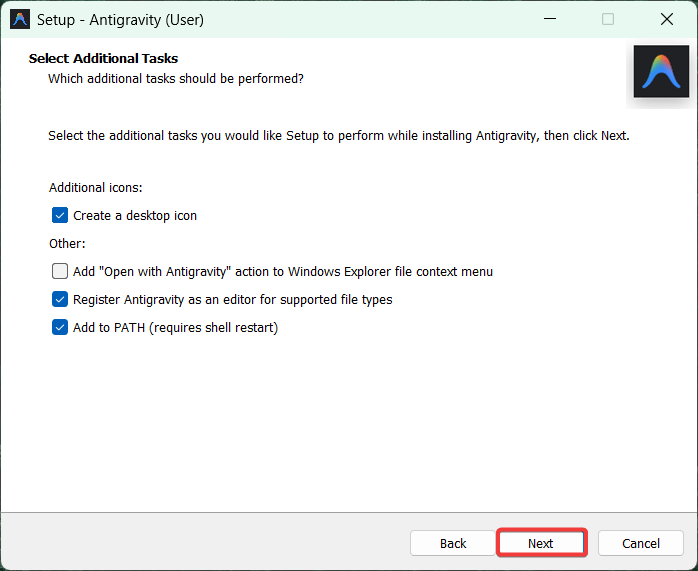
- Step 4 : It will ask you to select additional tasks, choose your preferences and click next.
- Step 5 : Select the start menu folder. After choosing it, select next.
- Step 6 : Click on install.
- Step 7 : After installation, click on Finish.
- Step 8 : Once after launching Antigravity it will ask you to choose interface preferences, but after that it will ask you to Sign in with your Google account. Don't forget to do that.




Real World Use Cases of Google Antigravity
Google Antigravity is designed for high-level software orchestration. It is particular is such scenarios :
- One use case is building a full stack application from a single prompt or a hand drawn design. What a user can do is, they can provide a vision and on the lines of that the agent handles the scaffolding, routing, and initial UI.
- Doing autonomous QA and UI Testing Using the built-in browser to actuate a website like clicking buttons, filling forms, and recording video proof to ensure a new feature works exactly as intended.
- Performing parallel engineering, for example - spawning three different agents to work upon three different bugs that need fixing at the same time. This allows a single developer to act as a project manager having its own AI team.
- Doing documentation and maintenance by automatically scanning repositories to generate live, accurate .README files, technical documentation, and unit test suits.
Limitations of Google Antigravity
While Google Antigravity represents a massive leap toward autonomous coding, it is currently in a Public Preview phase. Early adopters and professional engineers should be aware of the following constraints:
- Rate Limits and Quotas: Because agents perform complex hidden tasks, such as researching, running terminal commands, and testing in the browser they consume model tokens quickly. Currently, free-tier users face rate limits that refresh every five hours, which can stall long development sessions.
- The Death Loop Risk: In autonomous mode, an agent may enter a recursive loop where it tries to fix a bug, fails, and immediately tries an identical or similarly flawed fix. Without human oversight of the implementation plan, this can lead to shredded code or unnecessary file changes.
- Workspace Security Restrictions: To protect users, Antigravity requires you to manually trust a folder before an agent can run terminal commands. If a workspace is not trustable, the agent’s core capabilities like autonomous testing and dependency installation are disabled, reverting the tool to a basic text editor.
- Stability and Model Overload: As a high-demand preview product, users occasionally encounter model provider overload errors or lag within the interface. While the platform is built on a robust VS Code foundation, the heavy AI orchestration can sometimes cause the IDE to hang during complex multi-agent tasks.
- Learning Curve for Manager Mode: The greatest limitation is often human. Moving from a Writer (typing code) to an Architect (managing agents) requires a significant shift in mindset. Developers must learn how to audit Artifacts (screenshots, plans, and logs) rather than just reading code diffs.
Conclusion
Hopefully after going through this article you have understood what Google Antigravity really is and how it can assist developers in completing their tasks. Please follow the installation process in the correct order so that nothing is missed and fill your preferences carefully. If you encounter any problem or have any doubts please feel free to comment below.
xFanatical Articles -
- How To Easily Add Google Meet Links To Calendar Events
- How To Force Devices To Update To The Latest ChromeOS Version
- How To Conduct A Google Meet With More Than 500 Participants?
For more article please visit our website: xFanatical Articles

