
Introduction
Google recently rolled out two of the most awaited and appreciated features for the users and businesses who heavily depend on storing important files on Google cloud based service Google Drive. The new features solely focus on detecting ransomware attacks and pausing file syncing when ransomware is detected. The user will see a notification appear on their computer, Admins will see an alert in the Admin console security center. And notification emails will be delivered to both users and admins.
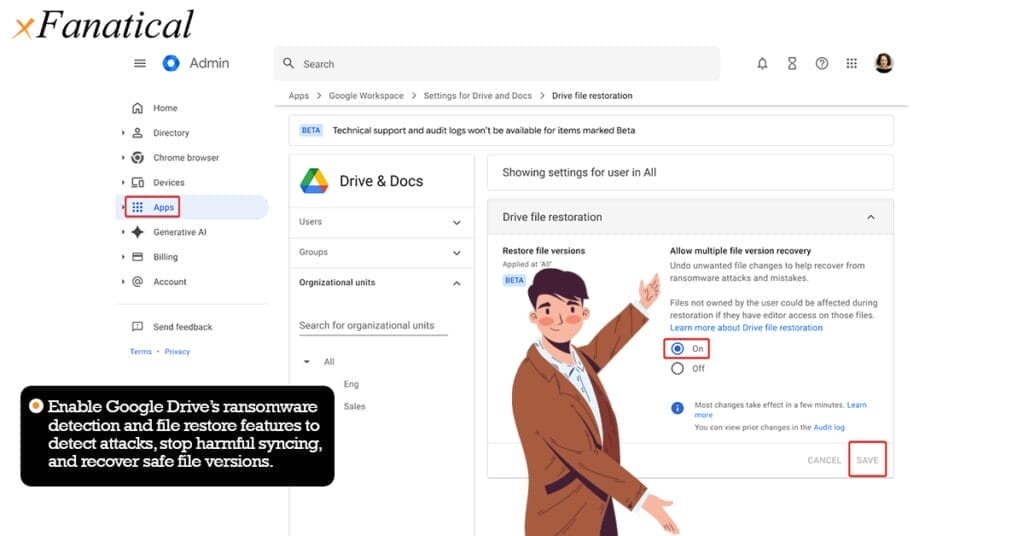
Another feature is the file restoration. This feature ensures that Users are able to restore their files to a previous version in Drive with ease, saving them time and money without paying a ransom. Users can select and restore multiple files prior to when ransomware infected their computer, making their files inaccessible.
Note : This feature was announced in the Google Workspace Updates blog (Late 2024 / Early 2025). It is currently rolling out to Google Workspace domains using Drive for Desktop on Windows. Availability may vary depending on admin settings and organization type.
Why This Matters for Google Workspace Users
Many organizations who use Google Workspace often depend on Google Drive for syncing local company files to the cloud. If ransomware encrypts those local files, the encrypted version could sync to Google Drive. With this latest update, Google can intervene before the damage becomes irreversible. Ultimately these new features means :
i) Reduced downtime
ii) Lower risk of paying ransomware to decrypt the local files
iii) Better resilience for teams relying on cloud based collaboration.
Why Ransomware Is So Dangerous
Ransomware attacks are extremely dangerous because they encrypt your locally saved files, it spreads across connected devices and cloud storage, destroys backup files, and more often than not steals your data before locking it out. Ransomware attackers can also threaten you about leaking your personal and business related data in public domains. These attacks cause severe downtime, financial loss, and long term reputational damage to your organization, by the time these attacks are detected, encryption has usually already taken place. So these two new Google updates are extremely important and very essential for the health of your organizational data.
How to Access Ransomware Alerts and Restore Files in Google Drive
In this section we will discuss how to enable both of these features, follow the given steps below in the correct order to properly implement these features.
Note : This feature is available only for Google Workspace accounts, not for personal @gmail.com users.Currently, ransomware detection works only on Windows devices with Google Drive for Desktop installed. File restoration settings appear only for super admins and Drive/Docs delegated admins.
Steps to Enable Ransomware Detection
1 : Go to the Google Admin Console.
2 : Navigate to the Apps section.
3 : Under the Apps section click on Google Workspace.
4 : Under the Google Workspace click on Drive and Docs
5 : Then click on Malware and Ransomware.
6 : Enable the feature by clicking ON and the press Save.

When ransomware is detected:
i)A security alert is generated in the Admin Console → Security centre → Security dashboard.

ii)Email alerts are sent to super admins.

iii)Users receive a Drive desktop notification and file sync is paused.

Steps to Enable Drive File Restoration
1 : Go to the Google Admin Console.
2 : Navigate to the Apps section.
3 : Under the Apps section click on Google Workspace.
4 : Under the Google Workspace click on Drive and Docs
5 : Then click on Drive file restoration.
6 : Enable the feature by clicking ON and the press Save.

Conclusion
Hopefully this article has helped you understand the two new features launched by Google to tackle and mitigate the damage done by ransomware attacks. Please follow all the steps discussed above to correctly implement both the new features, and if you still have any doubts related to thai topic please feel free to comment below, we will connect as soon as possible.
Note : These features are reactive, not preventive. Organizations should still use antivirus and EDR tools to block ransomware before file encryption begins.
Ransomware detection does NOT:
- prevent ransomware from executing
- quarantine infected devices
- replace endpoint protection (EDR / antivirus)
Frequently Asked Questions
Q: Does this update protect all devices automatically?
A: No. It currently applies to Windows devices using Google Drive for Desktop (sync).
Q: Can encrypted files be fully restored?
A: Yes, admins can roll back to the last healthy file version available in Google Drive.
Q: Do I still need backups?
A: Absolutely. This feature is not a replacement for regular backups. Always maintain offline and cloud backups.
xFanatical Articles -
- Gemini Gets Image Creation Trick In Docs & Calendar Access In Gmail
- Ultimate Guide To Gmail Automation
- How To Effortlessly Translate Google Slides For Global Audiences
- How To Turn Off Gemini For Google Workspace?
For more article please visit our website: xFanatical Articles

