
Introduction
In this blog, we will discuss the three new Gmail features that make your inbox management easier to manage. These updates are a welcome addition and are powered by Google Gemini’s capabilities. We’ll go through each feature one by one so that you can use them confidently without confusion. We’ll also cover their pros and cons to help you decide which features suit your workflow best.
AI Overviews for faster catch-up
When you open your Google Gmail after a few days, you might notice a number of new emails present in your inbox, this stack of new emails and replies might feel daunting at the very first look, but don't worry with the help of the new AI overviews feature in Gmail you can easily understand what the conversation is all about by the help of a quick and to the point summary provided to you incorporating relevant information from all the unread emails and replies. This not only brings down the burden on you but also helps you to make quick decisions where time is of essence.
Pros of this feature
- Instant Summarization: Automatically distills long, complex email threads into concise bullet points, highlighting key decisions and action items.
- Helps you find facts : The AI understands the main agenda of the messages and provides you with proper facts that act as the core of the conversation.
Cons of this feature
- Hallucinations: The AI can hallucinate and might state wrong facts that could completely mislead you regarding your emails.
- Privacy concerns: To efficiently work the AI needs access to your emails, this might count as a privacy violation as AI might get trained on your data, Google denies any use of your data but we can't be too sure.
- Over-reliance: Users may stop reading full emails, relying solely on summaries and missing critical fine print or emotional cues from the sender.
Note: This feature is only available in the US and in English.
To get an AI Overview in Gmail search:
- You need an eligible Google AI plan:
- Turn on smart features in your account.
- Use Gmail in a web browser on your computer.
AI Inbox for Urgent Messages
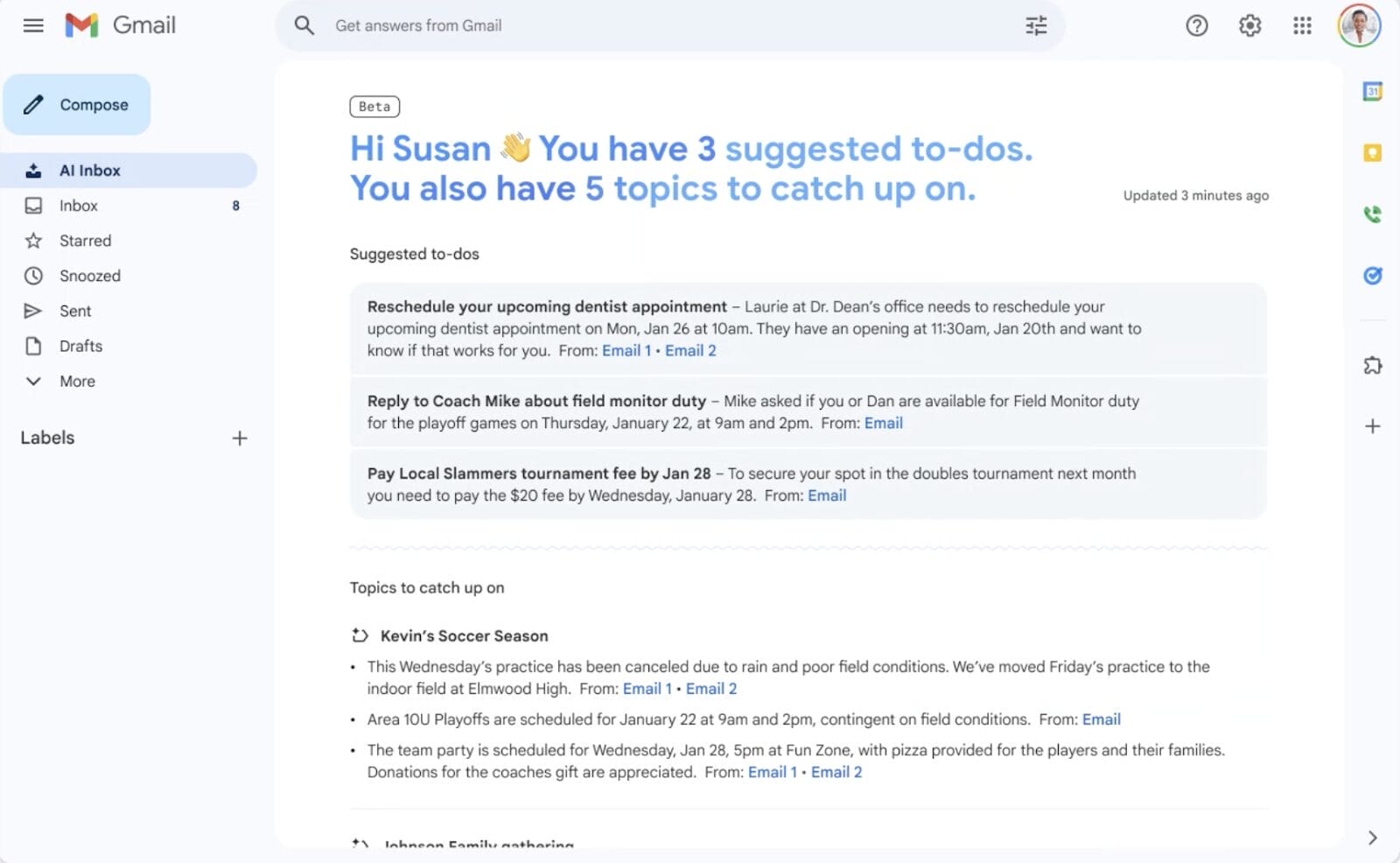
This is a very useful feature for people who face problems in segregating their important mails from unimportant ones. This new feature makes this task a lot easier for you by making two prominent sections from which you can easily pick your stride.
There are two main sections:
- Suggested to-dos: This section shows things that need your attention or action from incoming emails. It identifies high-priority items and explains what you need to do in bold text, like a due date for a utility or credit card bill.
- Topics to catch up on: This section gives you a quick summary of important updates. It helps you stay updated on things like upcoming travel, restaurant reservations, purchase confirmations, and more.
Pros of this feature
- Reminds important events : Automatically scans for and highlights deadlines, bills due and appointment reminders so they stay visible until addressed.
- Effective Segregation : Segregates information in two main sections Suggested to-dos and Topics to catch up on this helps you set your priorities accordingly.
Cons of this Feature
- Silent Negligence: The AI can deprioritize emails it deems low-value (like newsletters or cold outreach). If the AI misses the mark, important messages may become effectively invisible without ever hitting your spam folder.
- Privacy concerns: To work effectively, the AI needs deep access to your contacts, behavior patterns, and attachment content.
Note : AI Inbox is currently available to select trusted testers in the US. As we learn from our trusted testers, we plan to make AI Inbox available to more people in the coming months.
Help Me Write to speed up replies
Replying to emails is not a hard task, but it certainly is a time consuming one. So to overcome this situation and save time Google has introduced a new feature called Help me write. This feature helps you write emails with polish and panache. You can give a comprehensive prompt summarizing what tone you want and what should be the core of the reply, and after that AI takes over and provides you with a top quality reply or an email draft which directly caters to what you want. 
Pros of this feature
- Helps you write : Generates full, structured email drafts from a simple phrase (e.g., Ask for a flight refund), giving you a starting point in seconds.
- Context-Aware Drafting: The AI reads the previous messages in a thread to ensure its suggested replies are relevant to the actual conversation history.
Cons of this feature :
- Contextual Misses: It may fail to pick up on subtle social cues, sarcasm, or the specific jargon of your industry, leading to awkward or confusing phrasing.
- Privacy & Data Sensitivity: Inputting sensitive company data or personal secrets into a prompt carries a risk, as that data is processed by Google's servers. In some configurations, this data could influence future model outputs.
Frequently Asked Questions
- Q1: Does Help Me Write work on the Gmail mobile app?
- A: Yes, You can easily find the Help me write icon (look for the pencil with sparkles) on both the Android and iOS apps, as well as on your desktop browser.
- Q2: Why can’t I see the AI inbox yet?
- A: Since the AI Inbox is a very complex update (it effectively ranks your life priorities), Google is testing it with a smaller group of people to maintain relevant standards.
- Q3: Can I ask questions about my emails?
- A: Yes, but this is a premium feature. If you have Google AI Pro or Ultra, you can type natural questions into the search bar (e.g., What was the quote from the plumber last month?) and get a direct answer instead of just a list of emails.
- Q4: Will the AI send emails without my permission?
- A: Never. When you use Help Me Write, the AI only generates a draft. You must review, edit and manually hit Send.
Conclusion
Hopefully after reading this article you have understood all about the three new Gmail features that make inbox management easier. Please go through the article thoroughly so you don't miss any important information. And if you have any questions or queries please feel free to connect with us by commenting in the comment section below, we will reciprocate as soon as possible.
xFanatical Articles -
- How Google Gemini Detects Whether a Video is Real or AI-Generated
- How to Block Off Time to Work on a Task in Google Calendar
- What is Google Antigravity and How it is Useful to Developers
For more article please visit our website: xFanatical Articles

