
Introduction
This guide explains how to turn off Smart Reply in Gmail. In today’s world Gmail is widely used for communication and sending updates. Gmail has come up with many features to support users and help users work efficiently and effectively. One of such features is Smart Reply suggestions. Although it is helpful, some organizations and school administrators find it unfit for their environment.
In organizations, employees can blindly draft an email to an important client using the Smart Reply feature in Gmail without adding important human observations. Sometimes, the suggestions can go irrelevant to the subject which causes confusion among clients. In the school environment, students can use this feature to send emails to peers and teachers, irrespective of email subject. This can make users lazy and reliable on the feature.
What is Smart Reply Feature in Gmail
The Smart Reply feature in Gmail is an AI tool powered by Google, which helps users to respond to emails quickly by providing reply suggestions. When a user receives an email, Gmail analyzes the email content and automatically displays suggestions.
For example - The user receives an email for the new feature approval, then a smart reply will suggest a reply option as Thank you, I will review and get back to you at the bottom of the email.

Who Benefits From Turning Off the Feature?
Google Workspace administrators, schools and organizations, who want more control over users' communication will be benefitted by disabling the Smart Reply feature.
- In an educational environment, disabling the feature will encourage students to write their own responses instead of depending on automated replies. This improves students' communication skills as well.
- For Google Workspace administrators, turning off the feature helps in improved team communication and maintain organizational standards.
How to Disable Smart Reply Feature in Gmail
Follow the below steps to disable the feature for individual users and Google Workspace admins -
Notes:
- The turn off changes made in the Google Admin Console may take up to 24 hours of time to show up across all users.
- When the Smart Reply feature is turned off, Gmail will not show the suggested replies at the bottom of your emails.
Turn Off Smart Reply for Individual Gmail Users
- Log into your Gmail account in your web browser.
- Click the Settings in the top-right corner.

- Select See all settings.

- Under the General tab, scroll down to Smart Reply.

- Select Smart Reply off to disable the feature.

- The changes will be automatically saved.


Disable Smart Reply in Gmail for Google Workspace Admins
Google Workspace administrator can disable the Smart Reply features for users by following the below steps -
- Sign in to the Google Admin console.
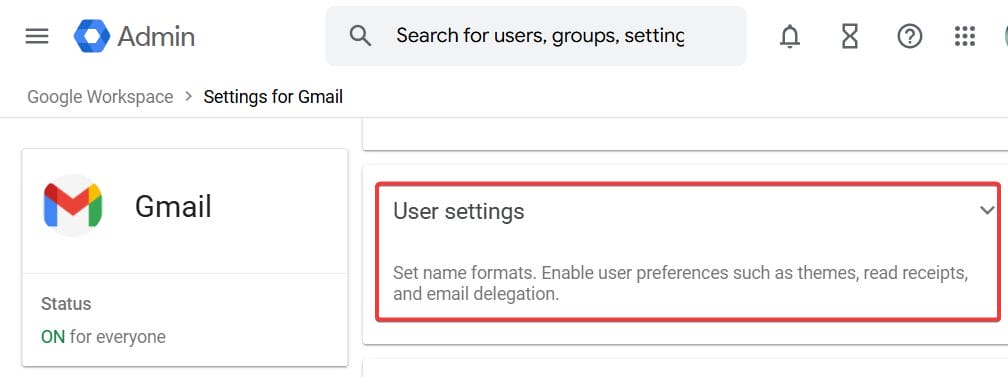
- Go to Apps > Google Workspace > Gmail.

- Click User settings.

- Select an Organizational Unit if you want to apply the settings to specific Organizational Units.
- Click on Smart features for Google Workspace.
- In the Default settings, uncheck Turn on smart features in Gmail, chat and Meet and Turn on smart features in Google Workspace services option to turn off smart reply in Gmail.

- Click Save to reflect the changes for all users.


Benefits of Turning Off Smart Reply in Gmail

- Turning off Smart Reply is essential for clear communication in any organization. Students and employees have to draft their own email responses rather than relying on Gmail reply suggestions.
- Turning off Smart Reply feature improves communication skills in students and minimizes the risk of inappropriate replies.
- Disabling the feature gives administrators control over users' communication as automated replies do not align with tone of voice.
- Overall, turning off Smart Reply is helpful when control and professionalism are a priority over speed.
Conclusion
In conclusion, disabling the Smart Reply feature in Gmail is an effective step towards enhanced communication and safety in organizations. It encourages users to write their own responses, rather than relying on the automated suggestions. By doing this you can support responsible email usage among users. This guide covers ways to disable the Smart Reply feature in Gmail and its benefits. Feel free to comment on your further questions and we will get back to you soon.
xFanatical Articles -
- How to Delete and Add Labels in Gmail
- How to Stop Duplicate Emails in Gmail Categories ?
- Ultimate Guide To Protect Your Gmail From Phishing Attacks And Scams
For more article please visit our website: xFanatical Articles

